Docker Sandboxes: a beginner’s guide to Codex and Claude Code
Docker Sandboxes gives coding agents a disposable microVM with its own operating system, Docker daemon, filesystem and network. A selected project workspace is shared deliberately, alongside the shared resources and credential paths described in Docker’s security model. This guide uses the standalone sbx CLI, then walks through a first Codex session and a first Claude Code session.[1][2][5][6][9]
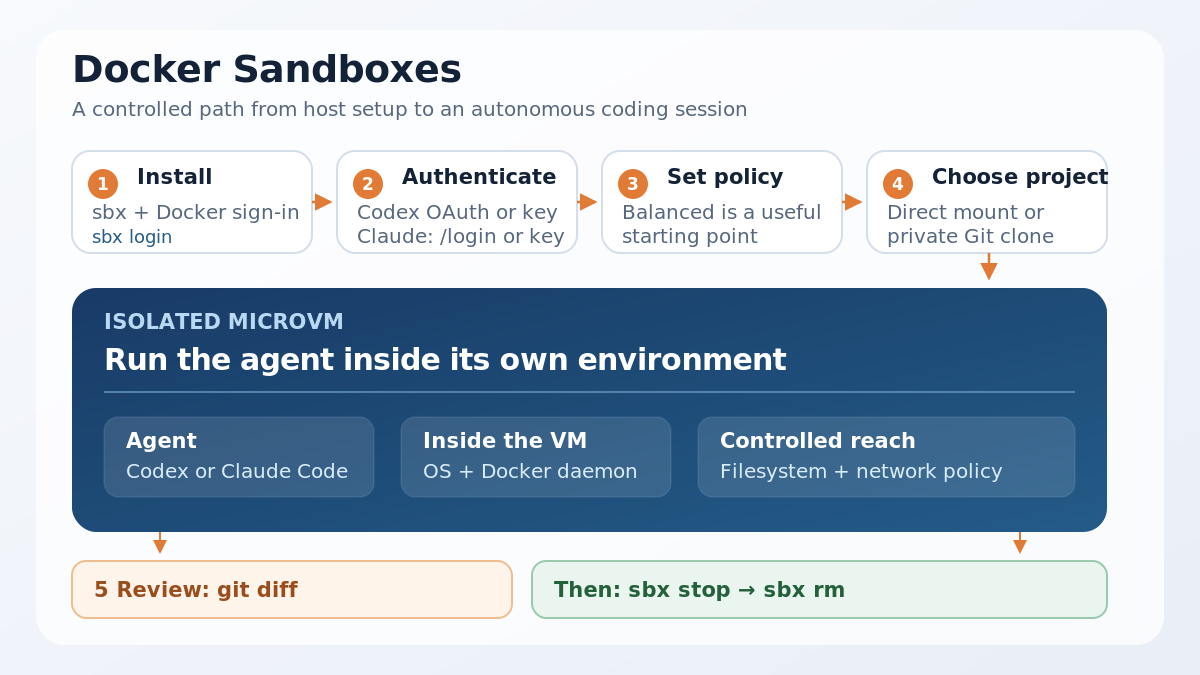
What Docker Sandboxes changes
Docker Sandboxes is a standalone sbx command-line workflow. Docker’s installation page lists macOS Sonoma 14 or later on Apple silicon, Windows 11 on 64-bit Intel or AMD with Windows Hypervisor Platform, and Ubuntu 24.04 or later on 64-bit Intel, AMD or Arm for the local runtime. Linux also needs KVM enabled and the user in the kvm group.[1]
The sandbox owns the operating-system changes, installed packages, Docker images and containers created inside it. A project path passed to sbx run, or the current directory when no path is supplied, is mounted read-write. The selected directory includes hidden files, configuration files, build scripts and Git hooks. Docker also documents a shared skills store and host-mediated credential paths. The project mount is the main writable boundary; other host interactions can occur through these documented shared mechanisms.[2][5][6]
For proxy-managed service credentials, Docker stores the provider value on the host and supplies it to matching requests, so the raw value remains outside the sandbox in that service flow.[6] Claude subscription login follows the interactive path described below. User-level Codex and Claude Code settings are not imported automatically; project-level configuration in the working directory is the portable starting point.[3][4]
Start from zero
Install the CLI for your host, then sign in to Docker:
# macOS
brew trust docker/tap
brew install docker/tap/sbx

# Windows PowerShell
winget install -h Docker.sbx

# Ubuntu 24.04+
curl -fsSL https://get.docker.com | sudo REPO_ONLY=1 sh
sudo apt install docker-sbx

# All hosts
sbx login
The Linux commands below target Docker’s documented Ubuntu 24.04+ matrix. A package or repository path alone does not establish support for other distributions, so check Docker’s current matrix before installing on a derivative system.[1] On Windows, local sandboxes also need Windows Hypervisor Platform. On Linux, check KVM before troubleshooting an agent:
lsmod | grep kvm
sudo usermod -aG kvm "$USER"
newgrp kvm
The first sbx run asks for a global network policy. Balanced is the useful starting point for most development work: common development services are allowed and other destinations are denied by default.[2] Review the active rules with sbx policy ls.
Choose one authentication route. Codex can use a host-side OAuth flow or an OpenAI API key.[3]
# ChatGPT or OpenAI OAuth
sbx secret set openai --oauth

# OpenAI API key, entered into the protected prompt
sbx secret set openai
Claude Code can use a Claude subscription with /login inside the session, or an Anthropic API key stored by sbx.[4][8]
sbx secret set anthropicThe commands prompt for secrets. Keep API keys out of shell history and out of files mounted into the project.[4][6]
Example 1: Codex in a sandbox
Open a repository and start the built-in Codex kit:[3][7]
cd ~/my-project
sbx run --name codex-docs codex
If no OpenAI credential is stored, sbx run codex starts authentication on the host before the sandbox launches.[3] Once Codex is ready, give it a small, reviewable task:
Read README.md, propose three concise improvements, apply only the documentation changes, and show the final diff.Docker’s Codex integration starts the agent with --dangerously-bypass-approvals-and-sandbox. The outer Docker Sandbox becomes the isolation boundary, while the mounted repository remains writable.[3] Inspect the result from the host:
git diff -- README.md
sbx ls
sbx stop codex-docs
The example separates the agent’s autonomy from the host’s operating system. It still leaves the reader responsible for reviewing the project diff before committing.
Example 2: Claude Code in a sandbox
Start Claude Code in a disposable branch with one task. With a Claude subscription and no API key, type /login inside Claude Code when it opens. Docker documents this as the interactive path. With an Anthropic API key, the sbx secret set anthropic command prepares the proxy-managed credential instead.[4][6][8]
Docker’s Claude Code kit starts claude --dangerously-skip-permissions by default.[4] The flag removes the usual approval prompts, so use a disposable branch or clone mode when the repository is valuable. The direct workspace used below keeps the review loop visible on the host:
git switch -c sandbox/claude-tests
sbx run --name claude-tests claude -- "Add a focused test for the parser and run the existing test suite"

git diff
sbx stop claude-tests
For a private Git copy, create the sandbox with sbx run --clone claude . instead. Changes then stay inside the sandbox until you fetch or copy them out. Removing the sandbox deletes that clone.[2][4]
The small checklist that prevents large surprises
Before either agent starts, commit or copy the work you care about. Confirm the workspace path, inspect sbx policy ls, and keep the first task narrow. After the session, review git diff, stop the sandbox, and remove it when the environment is no longer useful:
sbx rm codex-docs
sbx rm claude-tests
sbx stop preserves the sandbox for another session. sbx rm deletes its installed packages, images, configuration and private clone. Host files in a directly mounted workspace remain on the host.[2]
Docker Sandboxes makes high-autonomy coding easier to contain. A writable repository still needs care. Network access, credentials and the final Git review remain operator responsibilities.
Sources
[2] Get started with local Docker Sandboxes

