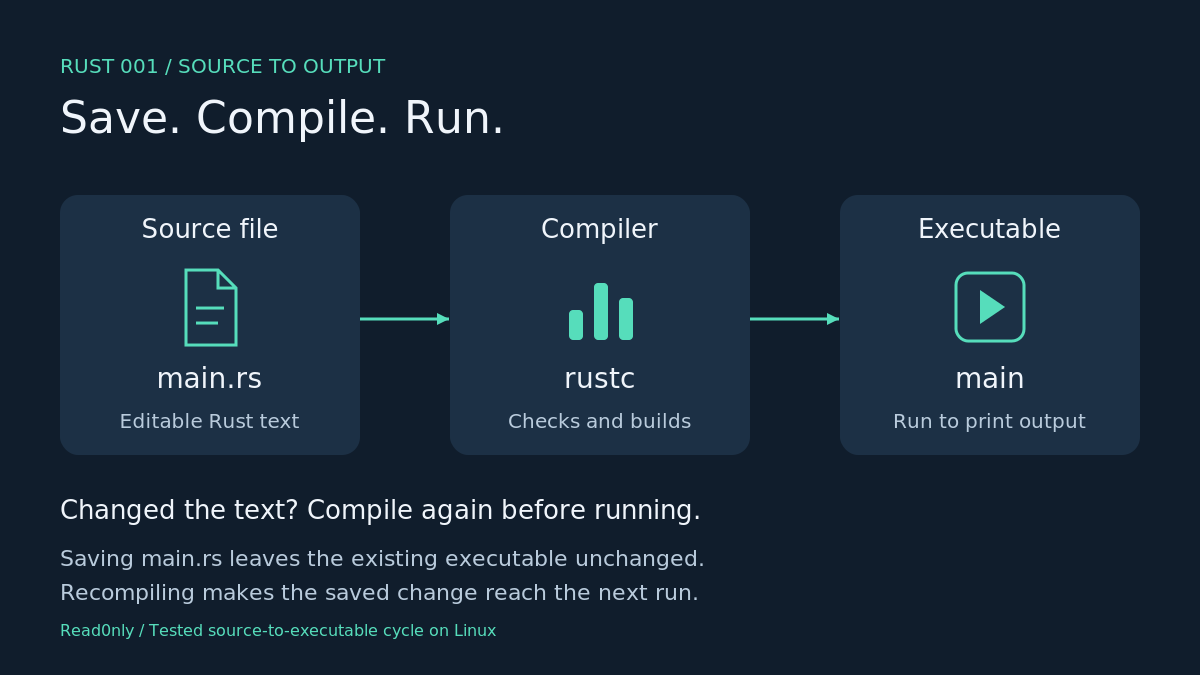
Your first checkpoint is a line of text printed by a programme you compiled yourself. The useful distinction is between the source file you edit and the executable you run. Rust uses a separate compilation step to turn one into the other.[1]
Check the compiler
Start with a terminal, a plain-text editor and an empty working folder. If Rust is absent, follow the official installation instructions for your operating system first. Those instructions cover rustup and the linker needed to build an executable.[2]
The commands below were tested on Linux ARM64 with the already-installed compiler shown here. Installation on other systems was outside this run. Type command lines without a leading dollar sign.
rustc --version
rustc 1.99.1 (58cf8f9c3 2026-10-13)
Save, compile and run
Create a file named main.rs in your working folder and save this complete programme. The .rs extension identifies a Rust source file. The main function is the entry point, with its body enclosed in braces.[1]
fn main() { println!("Hello, Rust!");}
The println! macro writes the quoted text to standard output and adds a newline.[3] Keep the exclamation mark, quotation marks and final semicolon as shown.[1]
Open the terminal in the folder containing main.rs. Compile it, then run the resulting main executable. These are two separate commands.[1]
rustc main.rs./main
Hello, Rust!
In this run, successful compilation printed nothing. The greeting appeared when the executable ran. The ./ prefix in the Linux command selects the file in the current folder.[1]
Make the change reach the screen
Replace the contents of main.rs with the version below and save it.
fn main() { println!("My first Rust programme.");}
Compile and run again using the same commands:
rustc main.rs./main
My first Rust programme.
Saving the changed source left the existing executable unchanged in our test. Running it before recompilation still printed the original greeting. Recompiling produced the new output shown above.
A common error
Keep the ! in println!. Removing it made this test fail to compile, with error E0423: “cannot find function println in this scope”. Restore the exclamation mark and compile again.
Exercise
Change the greeting to your own sentence. Save, compile and run it. Check that the terminal displays exactly the text between your quotation marks.
Next: Cargo, the project tool introduced in episode 002.[1]
Browse Rust, one step at a time


Leave a Reply