A growing Rust programme needs a predictable home for its source and build files. Cargo creates that project layout and manages the build.[1] It is Rust’s build system and package manager; this lesson uses its project and build commands without adding dependencies.[1]
Create the project
Use a terminal and an empty working folder with Rust already installed. This example was tested on Linux ARM64 with rustc 1.99.1 and Cargo 1.99.1. The recorded command output includes local paths and timings, which will differ on your machine.
Create a binary project named hello_cargo. The chosen option leaves Git setup out of this example.[1]
cargo new --vcs none hello_cargo
$ cargo new --vcs none hello_cargo Creating binary (application) `hello_cargo` packagenote: see more `Cargo.toml` keys and their definitions at https://doc.rust-lang.org/cargo/reference/manifest.htmlexit=0
Open the new hello_cargo folder in your editor and terminal. Cargo.toml is the project manifest: it records package information and dependencies.[1] The programme lives in src/main.rs, keeping source files together.[1]
fn main() { println!("Hello, world!");}
Cargo generated this complete greeting programme during the test. Leave it unchanged for the first run.
Three commands, three jobs
Run these commands from inside hello_cargo. cargo check checks the project without the final code-generation step.[2] It is a useful first check while editing. Some errors appear only during code generation, so a successful check can still be followed by a failed build.[2]
cargo build produces the executable in target/debug for this default development build.[1] cargo run builds as needed and runs the project’s binary.[1][3]
cargo checkcargo buildcargo run
$ cargo check Checking hello_cargo v0.1.0 (/opt/data/read0nly-rust-course/episodes/002/run/hello_cargo) Finished `dev` profile [unoptimized + debuginfo] target(s) in 0.45sexit=0$ cargo build Compiling hello_cargo v0.1.0 (/opt/data/read0nly-rust-course/episodes/002/run/hello_cargo) Finished `dev` profile [unoptimized + debuginfo] target(s) in 0.64sexit=0$ cargo runHello, world! Finished `dev` profile [unoptimized + debuginfo] target(s) in 0.03s Running `target/debug/hello_cargo`exit=0
In the fresh project, check succeeded without creating a runnable hello_cargo executable. build created it. run then printed Hello, world!. Cargo’s progress messages appeared on standard error; the programme’s greeting appeared on standard output. Both streams are retained below each command.
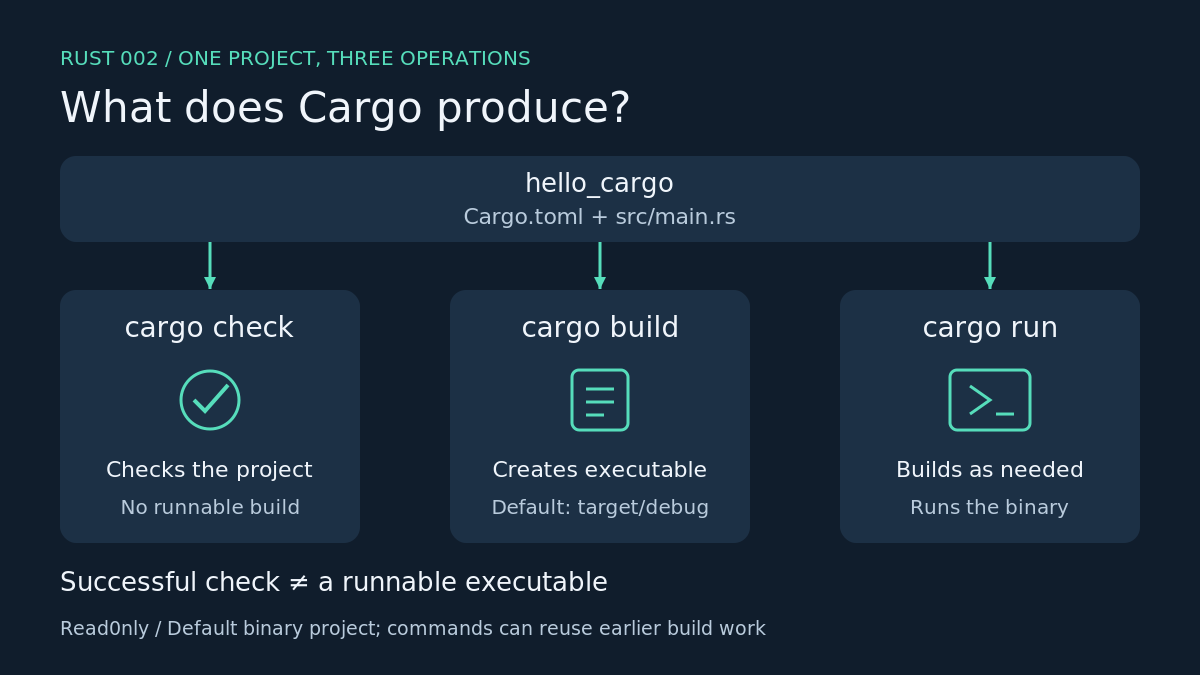
The commands can reuse previous build work. Running them in order does not mean each command compiles everything again.[1]
A common error
Running cargo check from the empty parent folder failed in our test. Cargo could not find Cargo.toml there or in any parent directory. Return to the project folder before trying again. This is a folder-selection error.
cargo check
$ cargo checkerror: could not find `Cargo.toml` in `/opt/data/read0nly-rust-course/episodes/002/run` or any parent directoryexit=101
Exercise
Change the quoted greeting in src/main.rs to Cargo project ready. Save it and use cargo run again. Check that the new sentence appears.
Next: variables, immutability and mut, through a small counter.
Browse Rust, one step at a time


Leave a Reply