A stock counter starts with three items. Give that quantity a name so the next line can use it without repeating the number. Then add two incoming items and print the updated quantity.
Name the quantity
The equal sign assigns a value to a variable.[1] A variable name lets you refer to that value later. Save this complete example as stock.py:
stock = 3print(stock)stock = stock + 2print(stock)
python3 stock.py
35
Run the command from the folder containing the file, using your working Python launcher. These examples were tested with Python 3.14.9 on Linux; no extra packages are needed.
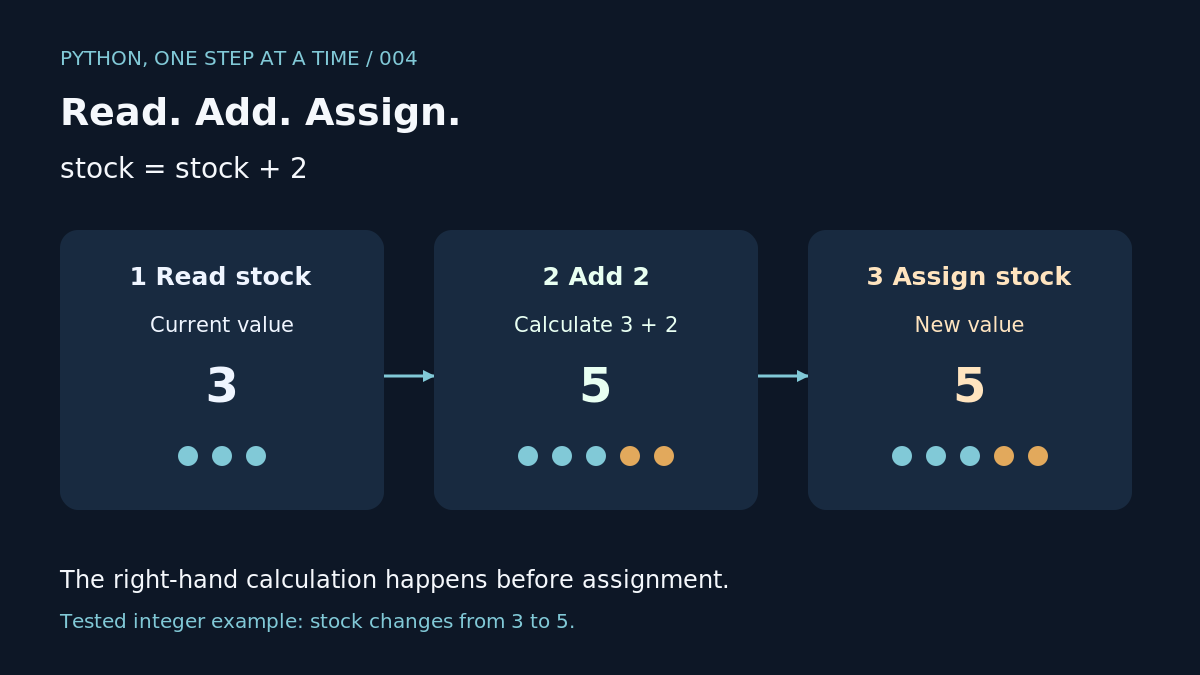
The first line binds the name stock to 3. Assignment can bind a name again to a new value.[2] Here, stock = stock + 2 reads the current quantity, adds two and assigns the result back to stock. The two print calls show the change from 3 to 5. Assignment itself prints nothing in this example.
Keep an earlier quantity
Try a second complete file:
stock = 3earlier_stock = stockstock = 5print(earlier_stock)print(stock)
python3 snapshot.py
35
Our output shows that earlier_stock still refers to 3 after stock is assigned 5. For these integer values, assigning one name to another does not create a live link between the names. Later lessons examine collections, where sharing a value needs more care.
Choose names that describe the quantity, such as stock or earlier_stock. For these examples, use letters and separate words with _. Python treats upper- and lower-case letters as distinct.[3] Keep stock spelt consistently throughout the file.
A common mistake
Using a name before assigning it a value raises an error.[1] Our separate test put print(stock) before stock = 3 and raised NameError. Move the assignment above its first use. Reading the full traceback is a later lesson.
Your turn
Start with eight items and add four. Print the quantity before and after the assignment. Predict both lines before running the file: our check produced 8 followed by 12. Next: input and conversions, so the quantity can come from someone using the program.

