We have three items in stock and need five. A useful first check is whether the available quantity meets the requirement. We can calculate that answer, give it a name and print it before deciding what the program should do next.
Ask one question
A Boolean represents a truth value. Python's bool type has two values, True and False, with capital initials.[1] For the integers used here, >= asks whether the left value is greater than or equal to the right value.[1]
Save this as stock-check.py. Run it from the same folder with your working Python launcher:
stock = 3required = 5enough = stock >= requiredprint(enough)print(type(enough))
python3 stock-check.py
False<class 'bool'>
Python evaluates the comparison on the right of = and assigns its result to enough. In our run, three items failed the requirement of five, so the stored answer was False. The second printed line identifies its type as bool. Both examples were tested with Python 3.14.9 on Linux, using no extra packages.
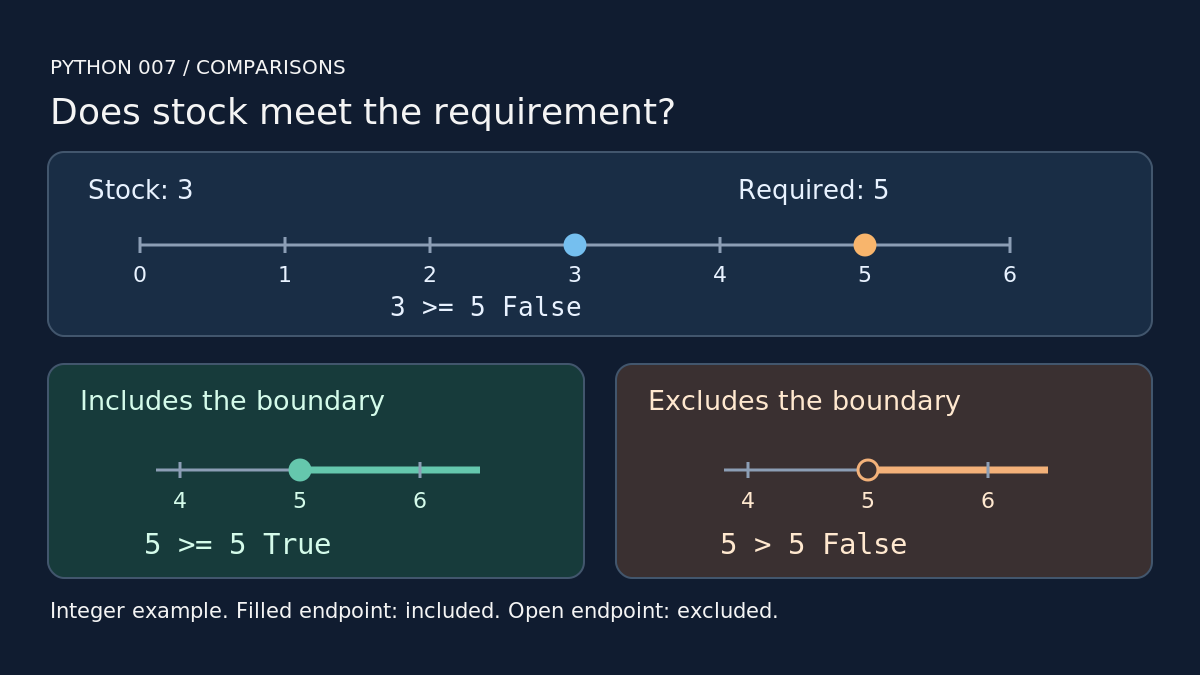
Check the boundary
The numeric comparisons used below are < (less than), <= (less than or equal), > (greater than), >= (greater than or equal), == (equal) and != (unequal).[1] Save this second file as boundary.py:
stock = 5required = 5print(stock < required)print(stock <= required)print(stock > required)print(stock >= required)print(stock == required)print(stock != required)
python3 boundary.py
FalseTrueFalseTrueTrueFalse
Each output line matches the comparison in the same position. With both quantities set to five, the inclusive comparisons <= and >= return True. The strict comparisons < and > return False. Equality succeeds; inequality fails. Testing this exact boundary helps catch a check that accidentally excludes the required quantity.
A common mistake
A single = assigns a value to a variable.[2] Use == to test equality.[1] If you replace an assignment with a comparison, the comparison asks a question and leaves the existing value alone. Keep the comparison inside print() when you want its answer displayed in a script.
Your turn
Change only stock = 3 in the first file to stock = 5, then to stock = 6. Predict both printed lines before each run. Check that enough becomes True in both cases. Next: use Boolean results with if, elif and else.

