Printing three batch labels by copying the same statement makes the programme awkward to change. A loop lets us write the action once and specify when repetition ends.
Repeat over a range
Tested on Linux ARM64 with rustc 1.99.1 and Cargo 1.99.1. Create a fresh project, then open its repetition folder in your editor and terminal.
cargo new --vcs none repetition
$ cargo new --vcs none repetition Creating binary (application) `repetition` packagenote: see more `Cargo.toml` keys and their definitions at https://doc.rust-lang.org/cargo/reference/manifest.htmlexit=0
Replace src/main.rs with this complete programme.
fn main() { for batch in 1..=3 { println!("Batch {batch}"); } println!("Done");}
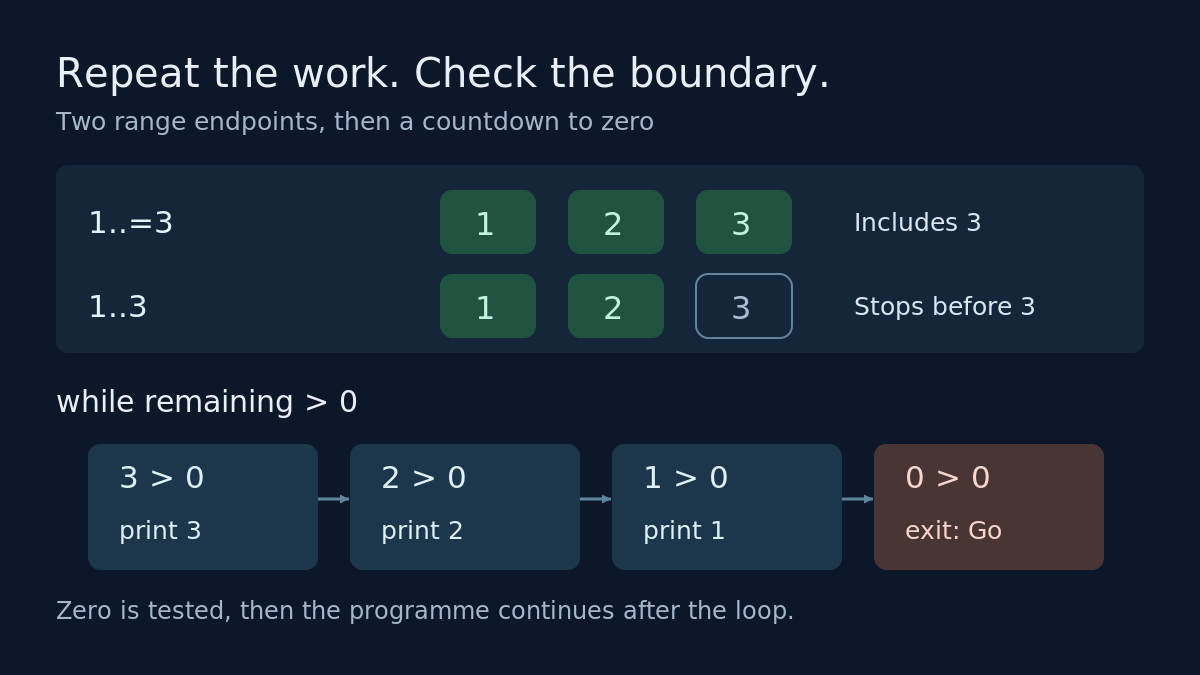
A for loop runs its body for each supplied item.[1] A range written with two dots excludes its upper endpoint.[2] Adding the equals sign includes it: 1..=3 supplies 1, then 2, then 3.[3]
Run from the repetition folder. Each terminal capture includes the command and its exit status.
cargo run --quiet
$ cargo run --quietBatch 1Batch 2Batch 3Doneexit=0
A common error: missing the endpoint
The similar range 1..3 excludes its upper endpoint.[2]
Changing our programme to 1..3 printed only Batch 1 and Batch 2 before Done. It compiled successfully, so this off-by-one mistake needs an output check.
Repeat while a condition holds
A while loop tests its condition before every iteration. A false condition ends the loop, including before the first iteration.[1] Replace src/main.rs with this countdown.
fn main() { let mut remaining = 3; while remaining > 0 { println!("{remaining}"); remaining -= 1; } println!("Go");}
cargo run --quiet
$ cargo run --quiet321Goexit=0
Here, mut allows the counter to change. The statement remaining -= 1 subtracts one after each printed number. At zero, the condition becomes false; zero stays unprinted and Go follows. Starting at zero printed only Go in our boundary run.
Keep the counter update: without it, this condition stays true and the countdown repeats indefinitely. Check what changes on each pass and how that change reaches the stopping condition.
Rust also offers loop, which repeats until an explicit exit. A break statement leaves the loop.[1] For this countdown, while keeps the stopping test visible in its header.
Exercise
Restore the batch programme. Change its range to 1..=5, predict the labels, then run it. Check that Batch 5 appears exactly once before Done.
Next: ownership and moves, following what happens when a value changes hands.
Browse Rust, one step at a time


Leave a Reply