Three items are available and five are required. Replenish the stock one item at a time, printing the new quantity after each addition. A while loop lets one small block of code do that repeated work.
Check, act, check again
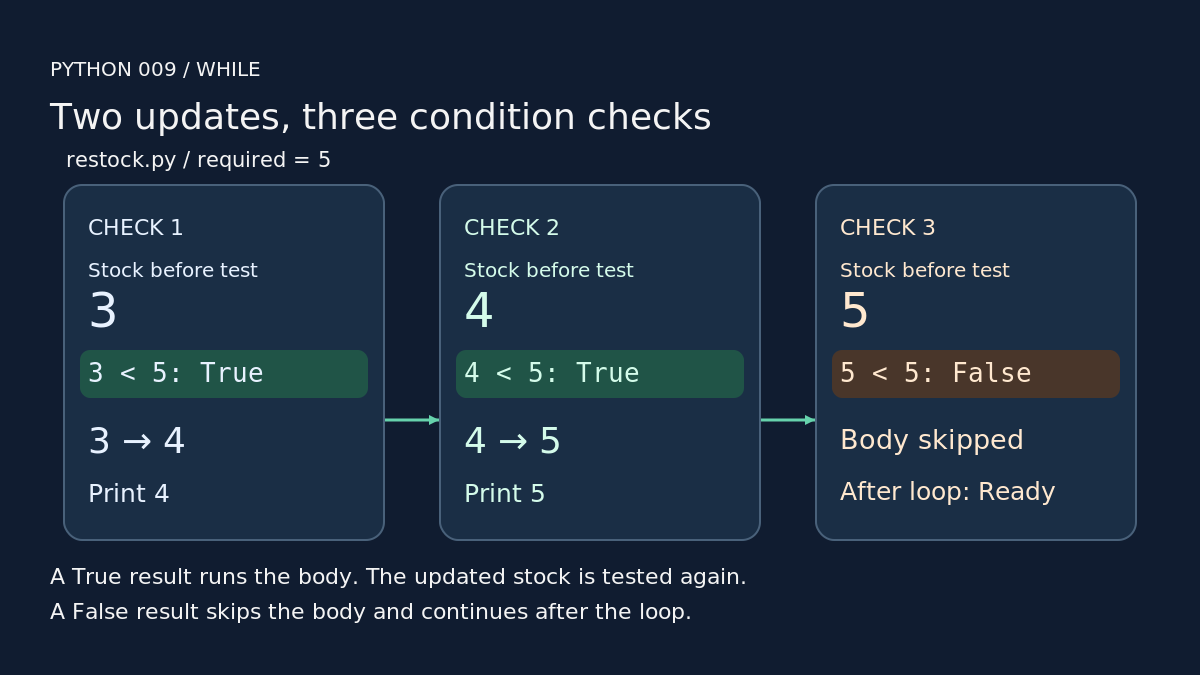
A while statement tests its condition before each repetition. A true result runs the indented body; a false result ends the loop. The body can be skipped entirely if the first test is false.[1]
Save this as restock.py. Run it from the same folder with your working Python launcher:
stock = 3required = 5while stock < required: stock = stock + 1 print(stock)print("Ready")
python3 restock.py
45Ready
The header ends with a colon, and indentation groups the statements inside the loop.[1][2] Use four spaces for both body lines. The final print("Ready") sits outside the loop, aligned with while.
Here, 3 < 5 is true. The assignment reads the current quantity, adds one and stores 4 back in stock. Then print(stock) shows 4. The next test uses that updated value: 4 < 5 is true, so the body runs again. At 5, the test becomes false and execution reaches Ready.
Both examples were tested with Python 3.14.9 on Linux, using no extra packages. They simulate quantity changes; they have no delays or connection to a real inventory.
Keep the update inside the loop. With the starting quantity unchanged at 3, this comparison would stay true on every check.
A common mistake: including the boundary
Changing < to <= adds another repetition in this example:
stock = 3required = 5while stock <= required: stock = stock + 1 print(stock)print("Ready")
python3 one-too-many.py
456Ready
At exactly five items, stock <= required still succeeds. The body adds a sixth item before the next check can stop it. Use < for this restocking rule.
Your turn
In restock.py, try starting quantities 5 and 6. Predict whether either run prints a number before Ready, then check. Finally, set stock to 1 and required to 4. Write down every printed line before running it. Next: counted repetition with for and range.

