Print labels for boxes 1, 2 and 3. Writing a separate print call for each box works, but changing the number of boxes would mean editing several lines. Give a for loop the numbers to work through.
One label per number
A for loop takes successive items from a sequence and runs its indented body for each one. Here, range supplies a sequence of integers.[1]
Save this as label-boxes.py. Run it from the same folder with your working Python launcher:
for box in range(1, 4): print("Box", box)print("Labels ready")
python3 label-boxes.py
Box 1Box 2Box 3Labels ready
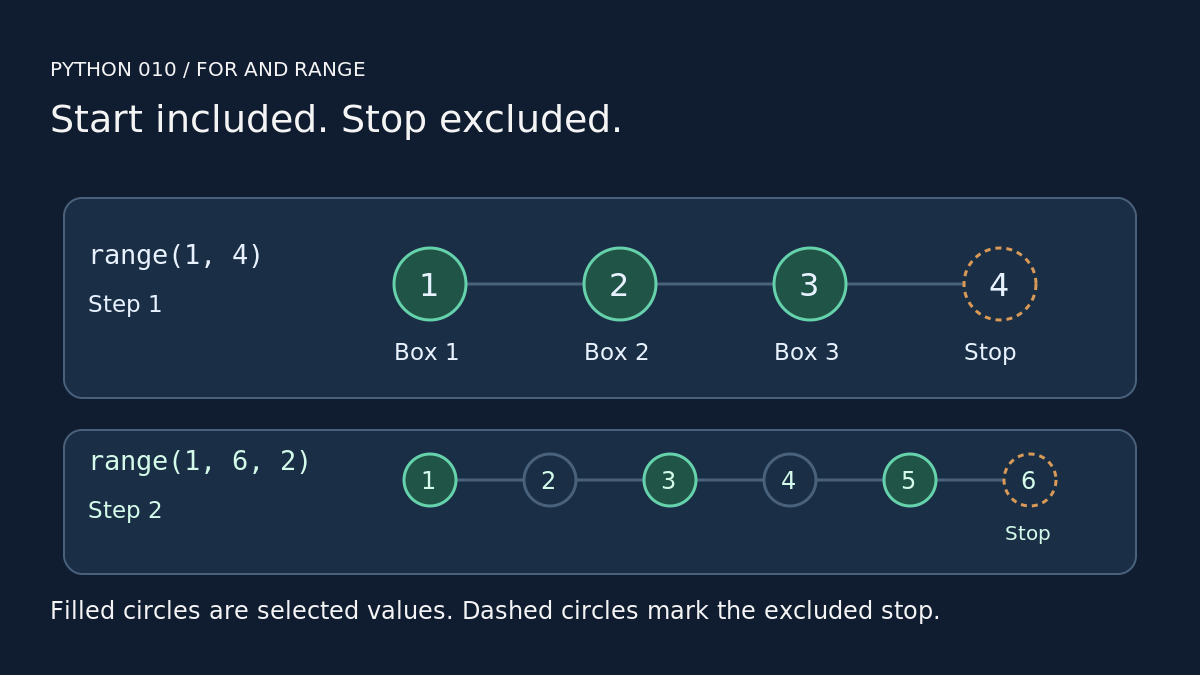
Read range(1, 4) as: start at 1, advance by 1, stop before 4. The stop value is excluded.[1][2]
On each repetition, box receives the next number. The two arguments in print("Box", box) produce the word and current number, separated by a space. Keep that line indented by four spaces. The final print call is aligned with for, so it runs after all three labels.
These examples were tested with Python 3.14.9 on Linux, using no extra packages. They print text only; they have no connection to a label printer.
Change the step
A third argument sets the step. A negative step moves downwards, with values staying above the excluded stop.[2]
print("Every second box")for box in range(1, 6, 2): print(box)print("Countdown")for number in range(3, 0, -1): print(number)
python3 range-directions.py
Every second box135Countdown321
The first loop selects 1, 3 and 5. The countdown selects 3, 2 and 1, then finishes before 0.
A common mistake: starting at zero
With one argument, range(3) starts at 0 and uses a step of 1.[2] For the label program, that produces Box 0, Box 1 and Box 2. Use range(1, 4) for labels numbered one to three.
The step defaults to positive 1, so range(4, 1) is empty.[2] In the label program, that range skips the body and prints only Labels ready.
Your turn
Write a loop using range(2, 9, 2). Predict every printed number before running it. Then adapt the countdown to start at five. Next: break, continue and loop termination.

