You have six boxes in a row. Box 2 has already been labelled. Box 5 marks the start of another batch, so leave it and everything after it alone. A single for loop can handle both decisions before it prints a label.
continue skips the rest of the current pass through the loop, and break ends the nearest enclosing loop.[1][2]
Save this as label-run.py and run it from the same folder. Both scripts were tested with Python 3.14.9 on Linux.
for box in range(1, 7): if box == 2: continue if box == 5: break print("Box", box)print("Run finished")
python3 label-run.py
Box 1Box 3Box 4Run finished
At box 2, continue sends the loop on to box 3 before print can run. At box 5, break exits the loop, so box 6 is never reached. The last print sits outside the loop and still runs.
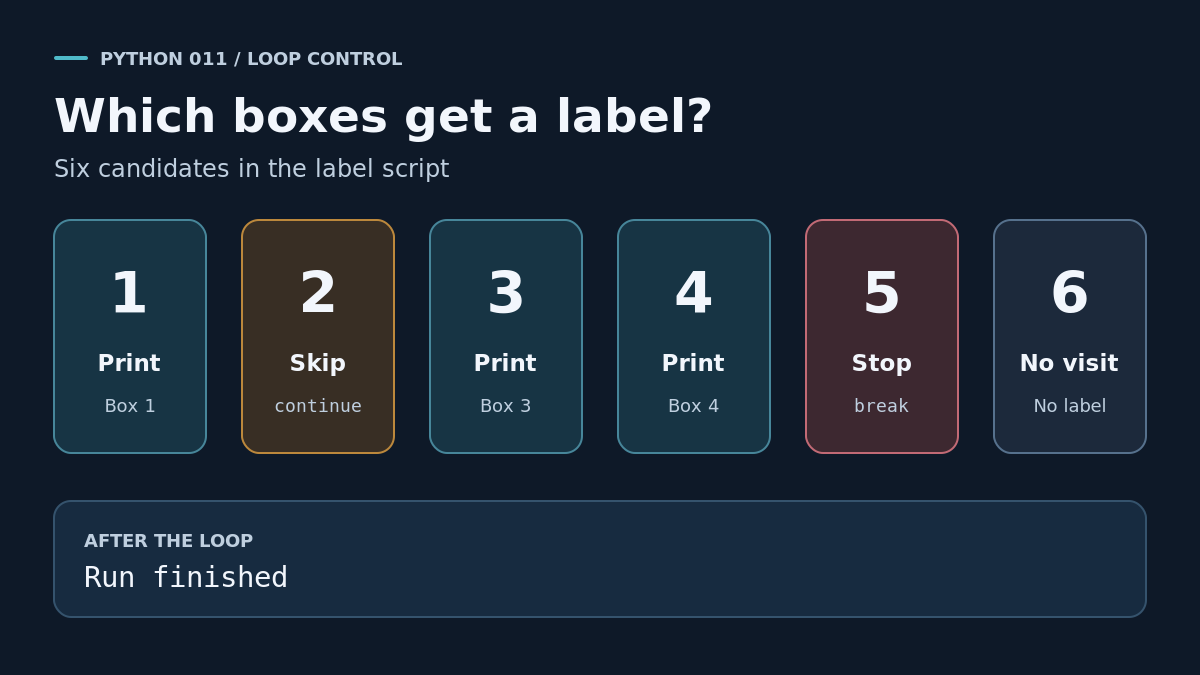
With no break, a for loop finishes when it runs out of values.[2] In this script, changing the stop check from box == 5 to box == 7 lets the loop reach the end of range(1, 7). You get labels for boxes 1, 3, 4, 5 and 6.
Keep a while loop moving
In a while loop, continue sends Python back to the condition.[2] If the condition is false, the loop ends.[2]
A common mistake is to put the counter update at the bottom of the loop. If continue skips that line when box is 2, the next test sees the same value and tries box 2 again. In the example below, the counter advances before the skip check, so it reaches 4 and the next test of box < 4 is false.
box = 0while box < 4: box = box + 1 if box == 2: continue print("Box", box)print("Run finished")
python3 count-boxes.py
Box 1Box 3Box 4Run finished
Your turn
In label-run.py, skip box 3 and stop on reaching box 4. Predict the labels before you run it, then check that Run finished still appears. The next lesson uses these loop controls in a small terminal game.

